Books and reports · Accounting
Accounting built for outdoor media billing
Invoices, vendor bills and payments post their own vouchers in OMMS, and every client, vendor and site has its own ledger — so the books follow the work instead of being typed in later.
Ledger Statement
Saffron Realty LLP
| Date | Type | Dr | Cr |
|---|---|---|---|
| 21 Oct | Sales 1216/26-27 | 1,57,648 | |
| 21 Oct | Receipt UTR 8f2a… | 1,00,000 | |
| 21 Oct | Journal TDS 194C | 2,000 | |
| Closing balance | ₹55,648 Dr | ||
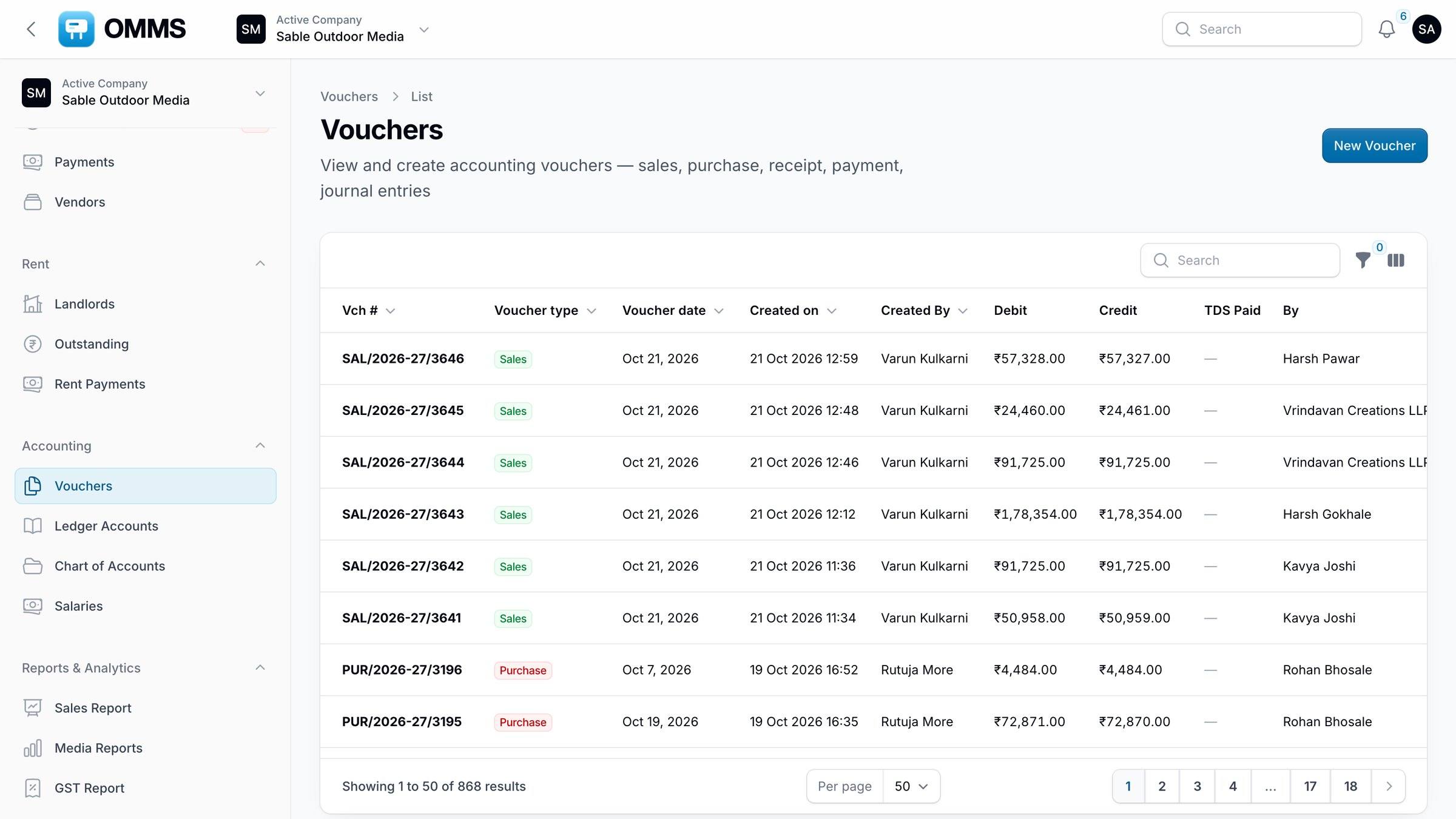
Vouchers by type.
Capabilities
What can you do with accounting in OMMS?
Vouchers
Sales, purchase, payment, receipt, journal, contra, credit and debit notes; PDF.
Ledger Accounts
Ledgers for clients, vendors and sites, with groups and opening balances.
Chart of Accounts
Assets, liabilities, income and expense groups.
Books
Cashbook, Bank Book, Day Book and Ledger Statement (Excel and PDF).
Bank reconciliation
Match bank entries against the books.
Year Closing
Close a financial year and carry balances forward.
Step by step
How does it work?
- 1
Invoices and bills post vouchers as you work.
- 2
Add journal entries and credit or debit notes where needed.
- 3
Reconcile the bank.
- 4
Close the year.
More screens
See it in OMMS
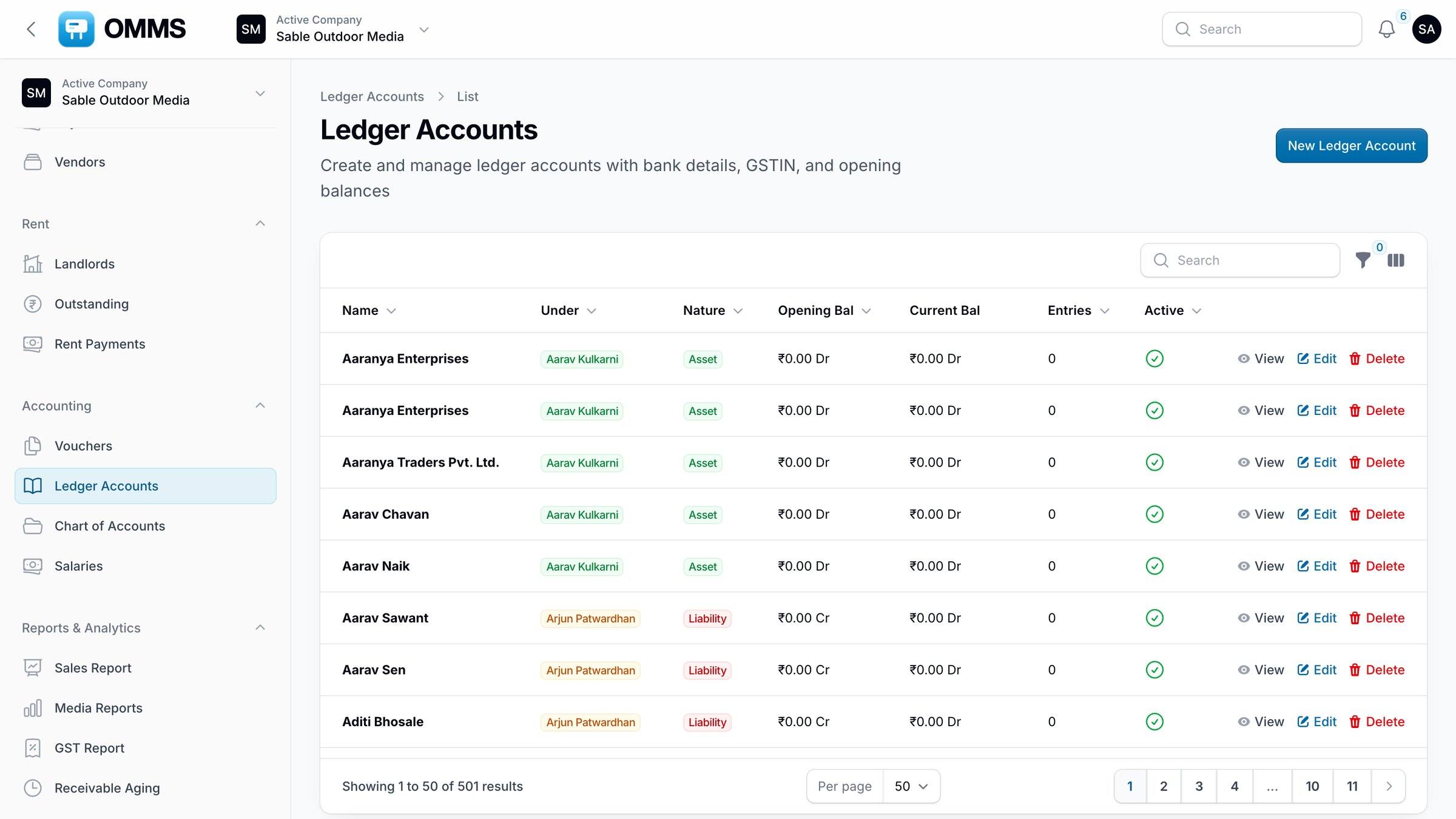
FAQ
Questions about accounting
Which voucher types does OMMS support?
Sales, purchase, payment, receipt, journal, contra, and credit and debit notes. Invoices, vendor bills and payments create their vouchers automatically; the rest are entered under Accounting → Vouchers, and every voucher downloads as a PDF.
Can I close a financial year in OMMS?
Yes. Year Closing closes the financial year and carries balances forward, after you have reconciled the bank and checked the Trial Balance. Invoice and PO numbering restarts for the new financial year.
Do I still need separate accounting software?
OMMS covers vouchers, ledgers, books, bank reconciliation, GST reports and year closing. Whether you also keep another package depends on how your accountant files; Excel exports make it easy to share.
Works with
Guides on this topic
- E-invoicing (IRN) for outdoor media companies in IndiaWhen an outdoor media company must e-invoice under GST, the 30-day IRN limit, credit notes, and how to handle FOC sites, cancellations and extensions.
- GST and TDS on outdoor advertising in IndiaHow GST and TDS apply to hoarding and outdoor advertising invoices in India: SAC code, IGST or CGST/SGST, GSTR-1, and TDS on payments and site rent.
See a booking go from free site to payment
A walkthrough on demo data: one site from proposal to collection, the field app, and the reports your accountant will ask for.